
Summary
Miovision builds traffic solutions that help cities create safer, healthier streets. Scout Plus is a portable, video-based traffic data collection device designed for quick, safe deployment. For the next iteration, Scout X, our team removed the on-device screen and adapted configuration and connectivity to a mobile experience. This change was to reduce the device’s size and weight, enabling faster installations and supporting more deployments across studies.
DURATION
November - December 2025
MY ROLE
User Research, Scoping, Mobile UX Design, Prototyping
MY Team
I worked with 1 other designer, a PM, and a team of engineers.
The Problem
The Scout Plus isn't selling well. Why?
Despite its predecessor the Miovision Scout being a success, the Scout Plus is not selling well. With the current Scout Plus design, field technicians are unable to install many devices at once due to the large size and heavy weight of the device. Therefore, for the Scout X, Miovision pivoted to removing the screen altogether to reduce the device size. Without a screen, the team needed to find a way to allow technicians to configure the device using their mobile devices.
Research
Meet Bryan, A Field Technician
I reviewed existing research on field technicians to better understand their workflows and day-to-day constraints. This helped me identify key pain points and opportunities to improve the Scout X experience.
Bryan
FIELD TECHNICIAN
Primary goal is to quickly set up, and maintain device/equipment, and to fix issues arising with devices or traffic equipment.
Demographics
Devices
Ages: 19- 50
Mobile
Tablet
Needs
Efficient device deployment
Connection outside the office
Safe work environment
Understandable alerts and statuses
I need to make sure I install all the devices on my field sheet before the end of the day.
Pain Points
Miovision hardware is difficult to learn
Device may not perform well in all weather
Often no laptop/computer
User Interviews and Shadowing Technicians.
In addition to creating a persona based on the information I had at hand, I had to opportunity to shadow field technicians installing Miovision devices.


01
Miovision's Scout Plus is large and heavy, making it difficult for technicians to carry the devices and install multiple in one trip.
02
The built-in screen in the Scout Plus is hard to see in sunny environments, making configuration difficult and take up more precious time.
Goal
Enable field technicians to configure Scout X devices locally using their mobile device.
Without a screen on the Scout X, the device configuration process will happen on the technician's phone. It's important that we make this experience simple and intuitive for technicians to quickly set up devices.
Key Requirements
We defined 3 primary opportunities for the MVP Design.
I partnered with the PM on my team to define the core jobs to be done and functional requirements across each stage of the Scout X installation journey. This analysis helped us identify the most impactful segment to focus on for Q1, while laying the groundwork to scale the solution across the full journey over time.

01
For Q1, we will focus on the configuration part of the journey and eventually scale our solution to the rest of the experience.
02
The time it takes to configure a Scout X must not exceed the time it takes to configure the Scout Plus (10 minutes).
After multiple meetings with the PM and engineering team, we aligned on scope and created a Phase 1 PRD that defined the requirements for the MVP configuration experience.
🛜
Wireless Connection
Must securely connect to the device via local wireless protocol (WiFi or Bluetooth) without requiring an active cellular connection.
❤️
Device Health
Must be able to verify device health, such as battery and SD capacity.
📹
Study Configuration
Must be able to aim the camera, view live camera feed, and start a standard video study locally.
Design
I presented wireframes to get the conversation started.
There was still uncertainty in my team about the ideal user journey for this experience. I worked with my PM to create wireframes of this experience for the next meeting to drive our conversation.

01
Wireframes guided the team's conversations and helped apply a vision to an idea.
02
Allowed me to clarify technical assumptions that I had initially made.
03
Helped identify the correct verbiage and nomenclature to use throughout the experience.
Construct the Information Architecture.
With feedback from my wireframes, I clearly defined a new information architecture that believed would fit this experience better.

I created high fidelity designs without colour first.
After working with my team to create many iterations of wireframes, I started to work on high fidelity designs. When presenting variations of the designs to stakeholders, I removed all colour and branding to help the audience focus on the interactions and experience, rather than the look of the design.

Final Design
I Added colour to the designs
I referenced Miovision’s design system to define the fonts and color tokens for the mobile experience, allowing engineers to reuse familiar components and tokens. Since the existing design system was built for desktop, I adapted font sizes and weights to ensure readability and usability on mobile.
Aa
Inter
H1 - 32px - Bold H2 - 24px - Bold H3 - 16px - Semi Bold Body - 14px - Regular
Mio Blue
#0F75DB
Success
#4CAF50
Warning
#F5A623
Alert
#D0021B
View vital device information.
Upcoming Recordings
Start Date
September 19, 2026 at 7:00 AM EST
End Date
September 19, 2026 at 11:00 AM EST
Duration
3 hour
Start Date
November 1, 2026 at 10:00 AM EST
End Date
November 1, 2026 at 11:00 AM EST
Duration
1 hour
Start Date
November 19, 2026 at 7:00 AM EST
End Date
November 19, 2026 at 11:00 AM EST
Duration
3 hour
Equipment Health
SD Capacity
24 GB Total
Available
12 GB
12 Hours
Allocated
4 GB
3 Hours
Used
8 GB
6 Hours
Battery
50 hours available
1
100%
2
50%
3
50%
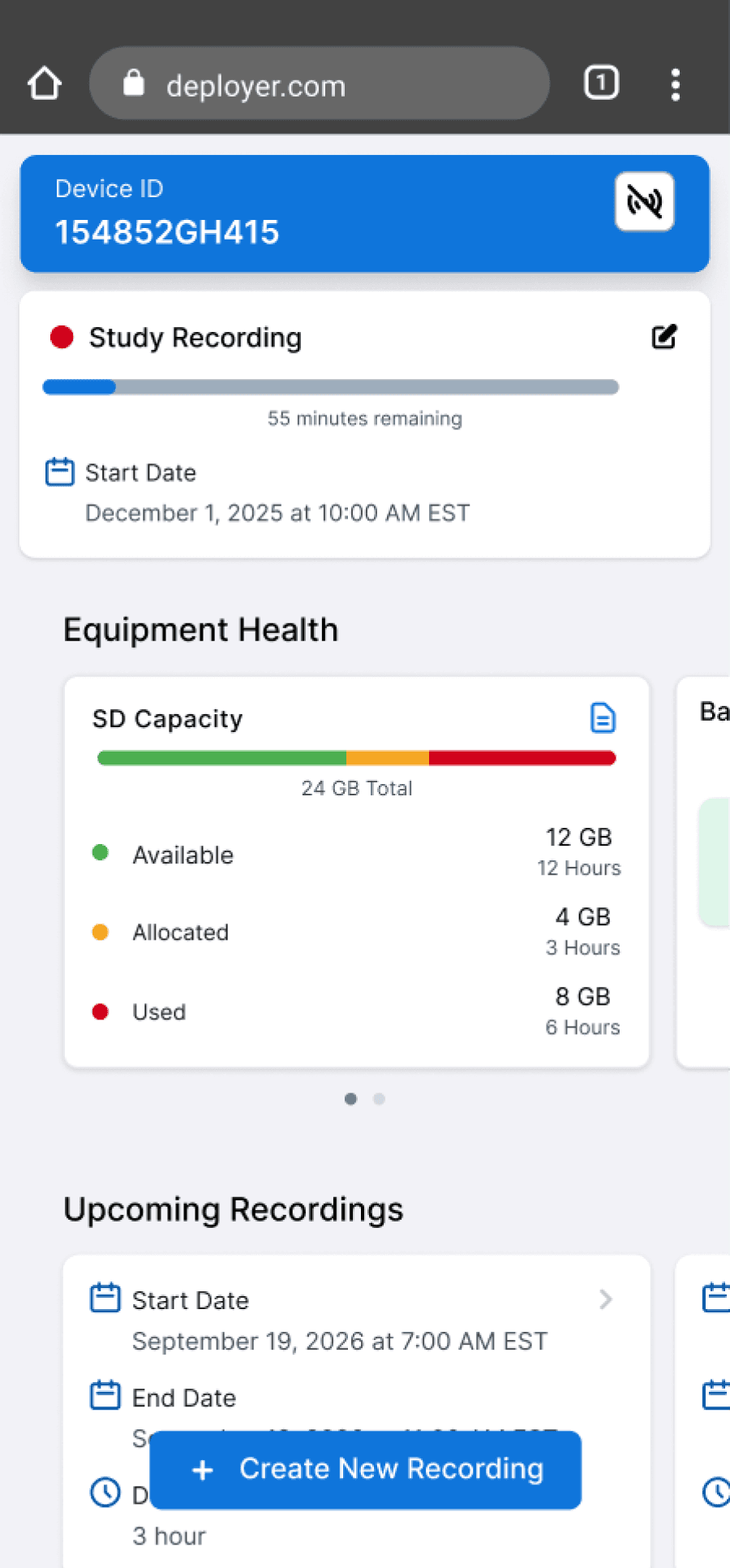
Study Recording
55 minutes remaining
Start Date
December 1, 2025 at 10:00 AM EST
set up your next recording.

Enter Study Details

Check Field of View
Outcome
⭐️
After conducting brief usability testing in the field, we discovered a decrease in configuration time by an average of 25%
💡
While the current UI was efficient to build because it closely followed Miovision’s design system, it still felt visually outdated. With more time, I would have liked to explore alternative visual design directions.
Reflection & Next Steps
Observing behaviour is often the most reliable way to uncover true pain points.
User needs are not always articulated clearly, which can lead to assumptions and biased insights. Observing technicians in their real workflows helped me gather more unbiased information and uncover insights that were often missed in interviews. This is a method that I will definitely use in the future!
Explore more visual designs.
Given the tight project timeline, I focused on designing a simple interface with minimal visual elements. In the future, I would like to explore a broader range of design directions that are less constrained by Miovision’s existing design system and branding.